Let’s build your first workflow
Creating a workflow from scratch
We are going to create a simple workflow that asks the user a yes or no question, makes a decision based on that question and collects some simple identifier information from them. Let’s get started.
- At the command line create a new file called ‘hello_world.yaml’.
touch hello_world.yaml
- Open the ‘hello_world.yaml’ file in your favorite editor and add the following contents:
version: 3
type: conversation
steps:
  - id: name
    prompt: Please enter your name.
    type: input
    value_type: text
    validators:
      - text_longer_than: 4
  - id: age
    type: input
    value_type: numeric
    prompt: How old are you?
    validators:
      - min: 9
      - max: 99
      - is_integer: true
  - id: validate
    type: input
    prompt: Are these correct? Name - ${name}  Age - ${age}
    value_type: boolean
  - id: test
    type: condition
    if:
      arg: ${validate}
      is: equals
      arg2: "true"
      then: output
      else: exit
  - id: output
    type: message
    prompt: Hello, ${name}.  Welcome to Kubiya!
  - id: exit
    type: exit
Validating a workflow
It is important to validate that the syntax and steps in a workflow. You will be unable to upload the workflow in Kubiya until it passes validation. To validate our new workflow, run the following command:
kubiya workflow validate hello_world.yaml
Uploading a workflow
In order to make the workflow executable, you must upload the workflow to the Kubiya Platform by running the following command:
kubiya workflow upload -n hello_world hello_world.yaml
When the upload is successful you will see the follwing message:

Launching a workflow
You can start a workflow from the CLI or within Slack. Both methods will start the workflow interaction in the Kubiya Slack Application
Launching from the CLI
To launch the ‘hello_world’ workflow from the CLI, issue the following command:
kubiya workflow launch -n hello_world -u <your slack email>
A successful launch will return:
launching workflow hello_world with user <your slack email>
Launching from Slack
-
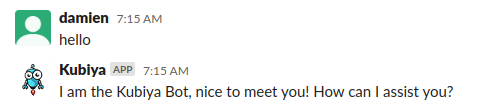
Enter the Kubiya Slack Application and send a ‘hello’ message
-
Send Kubiya the message: “execute a workflow”

Kubiya will respond with the list of available workflows.
-
Click on the ‘hello_world’ worflow. If necessary, expand the list to find the appropriate tile to click on.

-
Follow the prompts to walk through the workflow.

-
Congratulations! You have completed your first workflow.